Firefly, Midjourney, or DALL-E? An Australian's guide to AI image generators
Adobe Firefly is the AI image generator that comes with IP indemnity and Creative Cloud integration, making it the default pick for Australian professionals. Midjourney leads on image quality. ChatGPT is the easiest on-ramp. Here is how to choose.
When Adobe launched Firefly in March 2024, the pitch was simple: an AI image generator you could use without worrying about lawsuits. Two years on, that pitch has held up. Firefly now runs more than 30 models through a single web app at firefly.adobe.com. Google’s Nano Banana 2 is there. OpenAI’s GPT image model is there. Runway’s Gen-4.5 is there. Adobe’s own Firefly Image Model 5 is the default.
The legal safety comes from the training data. Adobe built its first-party models on licensed Stock images and public domain content. The company backs that up with IP indemnity. If a Firefly-generated image triggers a copyright claim, Adobe handles it. Midjourney offers nothing comparable. OpenAI’s terms are less clear. For anyone in Australia doing paid creative work, that indemnity settles the question before it starts.
Firefly is not free for everyone. But if you pay for a Creative Cloud plan (Photoshop, Illustrator, Premiere Pro, anything in the suite), Firefly is bundled in. Standalone pricing starts at $US9.99 per month (roughly $A15) for the Pro tier. A free tier exists too. It gives 25 generative credits each month, which is enough to try the tool on real work before committing.
How AI image generators actually work
Type a description. The model predicts pixels. That is the short version. The longer version: every image generator is trained on hundreds of millions of image-text pairs. When you give it a prompt, it runs a diffusion process. Random noise first. Then step by step, the noise resolves into an image that matches your words.
Firefly uses the same core technique as every other generator. The difference is that you are not stuck with one model. The interface at firefly.adobe.com lets you pick which engine to use. Adobe’s in-house model handles photorealistic commercial work. Google’s Nano Banana 2 is fast and follows prompts closely. OpenAI’s model draws on broad general knowledge. Runway Gen-4.5 produces cinematic output. You write one prompt. You run it against multiple models. You keep the best result.
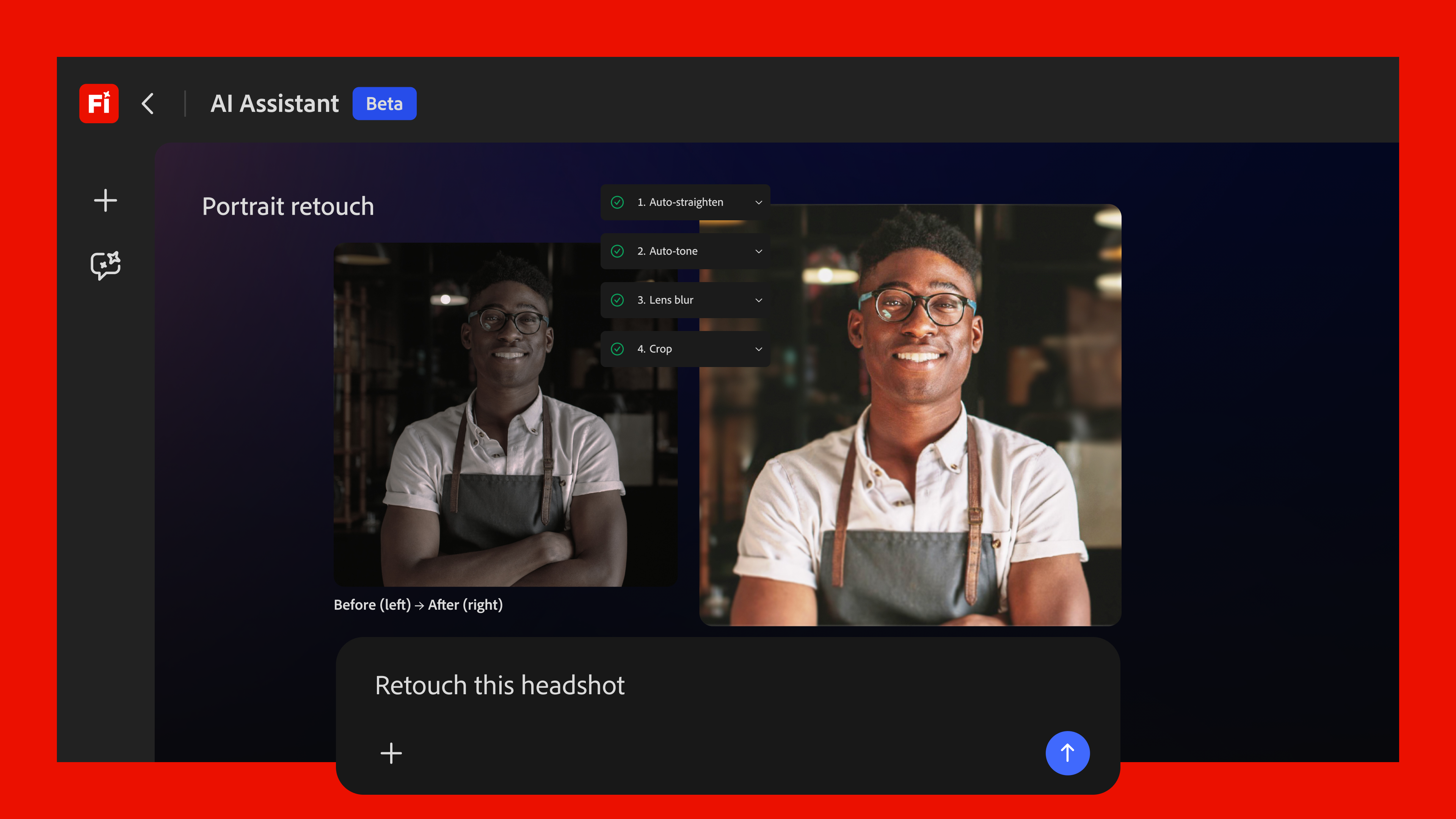
Firefly also has editing tools the standalone generators do not. Generative Fill works inside Photoshop. Select a region, describe what should replace it, and the model fills it in, matching the existing light and perspective. Generative Expand pulls the canvas outward past the original frame and fills the new area. Prompt to Edit, added in March 2026, accepts plain English: “swap the background for a Sydney beach at sunset.” No layer masks, no clone stamp.
The picks
Adobe Firefly: the commercial default
Firefly is not the strongest at any single thing. Midjourney still makes prettier pictures. Nano Banana 2 is quicker. But no other service bundles IP indemnity, Creative Cloud access, mobile apps on iOS and Android, and 30-plus models into one monthly bill.
The free tier covers 25 generative credits per month. That buys roughly 100 images at standard resolution. Pro ($US9.99/mo) removes the cap and adds unlimited standard-resolution generations. Premium ($US19.99/mo) adds 4K export and priority processing. Adobe does not list Australian dollar pricing for the standalone plans. Creative Cloud bundles are billed locally: the Photography plan starts at $A14.29 per month and includes Firefly.
Custom Models entered public beta this year. Upload your own images and Firefly learns your style, your character designs, your photographic look. The model stays private to your account. For a brand team producing social assets against a tight visual identity, it replaces a workflow that used to take days.
Pros:
- IP indemnity on first-party models
- Included with Creative Cloud subscriptions
- 30-plus models in one interface
- Custom Models for brand consistency
- Mobile apps for on-the-go generation
Cons:
- Weaker raw image quality than Midjourney on creative work
- Free tier credits run out fast
- Standalone AU pricing is US-dollar billed
Verdict: The right pick for Australian professionals who need commercial-safe AI images and already work in Adobe’s ecosystem. Adobe Firefly
Midjourney: the artist’s pick
Midjourney dominates among creative professionals who put image quality first. Its V7 model, released in late 2025, produces images with a depth of colour, lighting, and composition that competing generators have not matched. The AI art communities on Reddit consistently rank it first for stylised and editorial work.
The trade-off is friction. Midjourney runs through Discord by default, though a web interface now exists. There is no free tier. Plans start at $US10 per month for roughly 200 images. There is no IP indemnity. For an Australian designer doing client work, that last point bites: if a client uses an image generated in Midjourney and a copyright claim lands, the designer wears the risk.
Pros:
- Top-tier image quality and aesthetic control
- Strong community and prompt-crafting culture
- Iteration tools (variations, upscaling, remixing) are excellent
Cons:
- Discord-based workflow is clunky for non-gamers
- No IP indemnity
- No free tier
Verdict: The pick for creative and editorial work where image quality trumps legal safety. Midjourney
ChatGPT and DALL-E: the beginner’s on-ramp
OpenAI’s image generation runs inside ChatGPT. Anyone who already pays for ChatGPT Plus ($US20 per month, roughly $A30) gets it at no extra cost. You describe what you want in the same chat window you use for everything else. The latest model, GPT Image Generation, handles complex prompts with high accuracy and can render legible text inside images, a weak spot for earlier AI generators.
DALL-E 3 comes with the same subscription. For an Australian small business owner who needs a quick hero image for a blog post or a social media graphic and does not want to learn another tool, ChatGPT is the simplest option. The quality is fine for most non-print uses. But there is no IP indemnity, no custom model training, and no editing suite comparable to what Adobe bundles.
Pros:
- Zero learning curve if you already use ChatGPT
- Strong prompt adherence and text-in-image capability
- Good general-purpose quality
Cons:
- No IP indemnity
- No professional editing tools
- Locked to OpenAI’s model only
Verdict: The easiest entry point. Good for casual use; not the tool for commercial production work. ChatGPT
Google Gemini and Nano Banana: fast and free-ish
Google’s Nano Banana 2 model, available inside Google Gemini and as a third-party model within Adobe Firefly, is the speed leader. It generates images in under three seconds on most prompts and handles photorealism well. Gemini’s free tier includes image generation with a daily quota. The paid Google AI Premium plan costs $A12.99 per month in Australia and includes 2TB of Google One storage.
For Australian users already paying for Google One, upgrading to the AI tier is a cheap way to add image generation. The quality sits below Midjourney for creative work but is competitive with DALL-E for general use. Google’s terms of service permit commercial use of generated images but stop short of the explicit IP indemnity Adobe provides.
Pros:
- Fastest generation speed
- Free tier available
- AU pricing in Australian dollars
- Bundled with Google One storage
Cons:
- Image quality below Midjourney for artistic work
- No dedicated editing suite
- No IP indemnity
Verdict: A solid secondary tool, especially for Google Workspace users who want fast, decent-quality images without another subscription. Google Gemini
What we would skip
Stay away from free AI image aggregator sites that promise access to multiple models without a subscription. These typically proxy your prompts through third-party APIs and log everything you type. Your brief, your brand name, your unreleased product images: all of it sits on someone else’s server with no privacy policy that has been read by a lawyer.
Also skip “AI detector” tools that claim to identify AI-generated images. The current generation of detectors is unreliable on short text and even less reliable on images. Adobe’s Content Credentials system embeds provenance metadata into Firefly-generated images. It tells you the image was AI-generated without pretending to catch things algorithmically.
Tools like Stable Diffusion and Flux are powerful but need technical setup. Unless you have a machine with a capable GPU and the patience to manage Python environments, they are not worth the friction. They make sense for developers building AI image pipelines, not for creatives who need an image by Tuesday.
Frequently asked questions
Is Adobe Firefly free in Australia?
Yes, with limits. The free tier gives 25 generative credits per month, enough for about 100 standard-resolution images or a smaller number of video generations. For unlimited generations and higher resolutions, the Pro plan costs $US9.99 per month and the Premium plan costs $US19.99 per month. Creative Cloud subscribers get Firefly included at no extra cost. Credit allocations vary by plan.
Can I use AI-generated images commercially in Australia?
It depends which tool you use. Adobe Firefly offers IP indemnity for images generated with its first-party models. Adobe shoulders the legal risk if a copyright claim arises. Midjourney, DALL-E, and Gemini permit commercial use in their terms of service but do not offer indemnity. Australian copyright law has not yet been tested on AI-generated images. That absence of precedent makes Adobe’s indemnity more valuable here than in jurisdictions where the law is settled.
Which AI image generator is best for Australian small businesses?
Adobe Firefly, for three reasons. First, the IP indemnity removes legal uncertainty that a small business cannot afford to litigate. Second, the free tier is enough to test whether the tool fits your workflow before paying. Third, if you already pay for any Adobe Creative Cloud product, Firefly is included. For a business that needs a few social media images per week, ChatGPT Plus at $US20 per month is a reasonable alternative with a shallower learning curve.
How does Firefly compare to Canva’s AI tools?
Canva, headquartered in Sydney, has AI image generation built into its platform. It is simpler than Firefly and tightly integrated with Canva’s template library. For non-designers, it is the fastest path from blank page to finished design. Firefly is more capable for professional work: higher resolution outputs, more models, Custom Model training, and the Creative Cloud editing pipeline. For a social media manager at a small Australian business, Canva’s AI tools are probably enough. For a freelance graphic designer or an agency, Firefly is the more serious tool. Canva
Do I need a powerful computer to use AI image generators?
No. All four tools discussed here run in the cloud. You access them through a web browser or mobile app. The heavy computation happens on Google’s, Adobe’s, or OpenAI’s servers. A stable internet connection and a modern browser are the only requirements. Local tools like Stable Diffusion need a dedicated GPU with at least 8GB of VRAM to run comfortably. Cloud-based generators remove that hardware barrier entirely.
Asha Iyer
AI editor covering the model wars, AU enterprise adoption, and the policy shaping both. Reports from Sydney.